---
title: "مناقشات المنصة: تواصُل واستفادة للجميع"
description: انقر النقاشات في شريط أدوات التصفُّح لبدء المحادثات مع المتدربين الآخرين. تسهل خاصية المناقشات تلاقح الأفكار واكتساب المزيد من المعرفة من الأقران انقر إضافة (Add ) لإنشاء غرفة مناقشة جديدة. سيؤدي ذلك
---
[تخطى الى المحتوى](https://help.lumofy.com/migration/ar-eg/مناقشات-المنصة-تواصُل-واستفادة-للجميع#main-content)
- [العربية - مصر](https://help.lumofy.com/migration/ar-eg/%D9%85%D9%86%D8%A7%D9%82%D8%B4%D8%A7%D8%AA-%D8%A7%D9%84%D9%85%D9%86%D8%B5%D8%A9-%D8%AA%D9%88%D8%A7%D8%B5%D9%8F%D9%84-%D9%88%D8%A7%D8%B3%D8%AA%D9%81%D8%A7%D8%AF%D8%A9-%D9%84%D9%84%D8%AC%D9%85%D9%8A%D8%B9)
- [English](https://help.lumofy.com/migration/engage)
العربية - مصر
إظهار القائمة الفرعية للترجمات
![Logo\_Lumofy\_EN\_Main\_Secondary\_Horizontal.svg\]](https://help.lumofy.com/hubfs/Logo_Lumofy_EN_Main_Secondary_Horizontal.svg)
- Home
- Products
- Pricing
- Blog
- Company
فتح التنقل الرئيسي
إغلاق التنقل الرئيسي
- Home
- Products
- Pricing
- Blog
- Company
- - [العربية - مصر](https://help.lumofy.com/migration/ar-eg/%D9%85%D9%86%D8%A7%D9%82%D8%B4%D8%A7%D8%AA-%D8%A7%D9%84%D9%85%D9%86%D8%B5%D8%A9-%D8%AA%D9%88%D8%A7%D8%B5%D9%8F%D9%84-%D9%88%D8%A7%D8%B3%D8%AA%D9%81%D8%A7%D8%AF%D8%A9-%D9%84%D9%84%D8%AC%D9%85%D9%8A%D8%B9)
- [English](https://help.lumofy.com/migration/engage)
العربية - مصر
إظهار القائمة الفرعية للترجمات
- اذهب إلى Lumofy.ai
اذهب إلى Lumofy.ai
مرحبًا. كيف يمكننا مساعدتك؟
- لا توجد اقتراحات لأن حقل البحث فارغ.
1. [مركز المساعدة](https://help.lumofy.com/migration/ar-eg?hsLang=ar-eg)
2. [لوموفاي للمتدربين](https://help.lumofy.com/migration/ar-eg/%D9%84%D9%88%D9%85%D9%88%D9%81%D8%A7%D9%8A-%D9%84%D9%84%D9%85%D8%AA%D8%AF%D8%B1%D8%A8%D9%8A%D9%86?hsLang=ar-eg)
3. [مناقشات المنصة](https://help.lumofy.com/migration/ar-eg/%D9%84%D9%88%D9%85%D9%88%D9%81%D8%A7%D9%8A-%D9%84%D9%84%D9%85%D8%AA%D8%AF%D8%B1%D8%A8%D9%8A%D9%86?hsLang=ar-eg#%D9%85%D9%86%D8%A7%D9%82%D8%B4%D8%A7%D8%AA-%D8%A7%D9%84%D9%85%D9%86%D8%B5%D8%A9)
# مناقشات المنصة: تواصُل واستفادة للجميع
### **النقاشات**
انقر **النقاشات** في شريط أدوات التصفُّح لبدء المحادثات مع المتدربين الآخرين. تسهل خاصية المناقشات تلاقح الأفكار واكتساب المزيد من المعرفة من الأقران
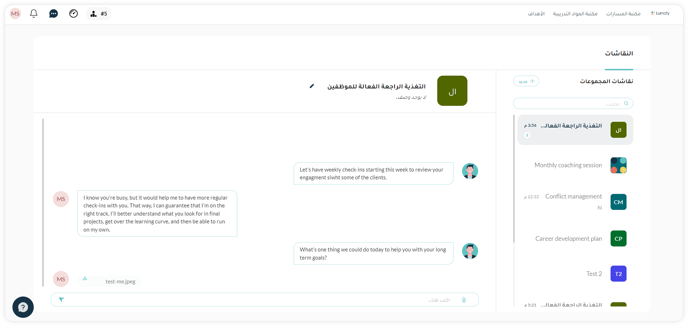
#### **1.إنشاء غرفة مناقشة جديد**
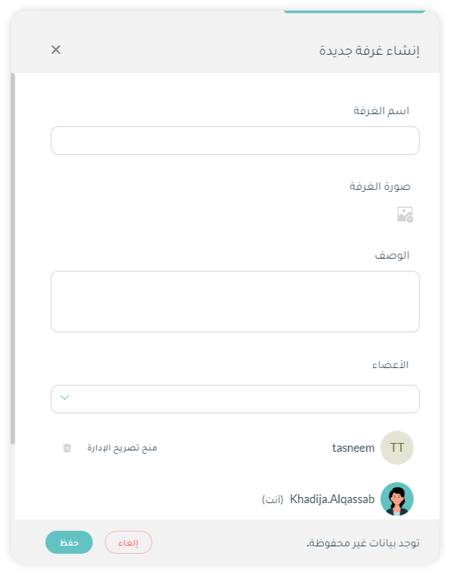
انقر **إضافة** (**Add**) لإنشاء غرفة مناقشة جديدة. سيؤدي ذلك إلى فتح نافذة منبثقة حيث يمكنك:
1. 1. **إدخال اسم الغرفة**.
2. **تحميل صورة** لغرفة المناقشة عن طريق نقر . بمجرد التحميل يمكنك تغيير الصورة بنقر **تحديث (Update )** أو إزالتها بنقر **إزالة (Remove).**
3. إدخال **وصف** لهذه المناقشة.
4. **اختيار المستخدمين** الذين ترغب في إشراكهم في هذه المناقشة بصفتهم أعضاء من القائمة المنسدلة أو ببساطة إدخال اسم المستخدم الذي تبحث عنه..
5. نقر **تعيين مسؤول (Make Admin )** لجعل المستخدم المحدد مسؤولاً عن غرفة المناقشة. إذا رغبت في إزالة تفويض المسؤول من أي مستخدم، انقر **إلغاء مسؤول** **(Revoke Admin).**
6. انقر **لإزالة عضو** من غرفة المناقشة.
7. انقر **إنشاء (Create)** لتأكيد التغييرات التي أجريتها أو **إلغاء (Cancel )** لتجاهل التغييرات والخروج من الرسالة المنبثقة.
#### **2. البحث عن غرفة مناقشة**
استخدم **شريط البحث** للبحث عن غرفة مناقشة معينة عن طريق إدخال اسم الغرفة في الشريط.
#### **3. تحرير تفاصيل غرفة مناقشة**
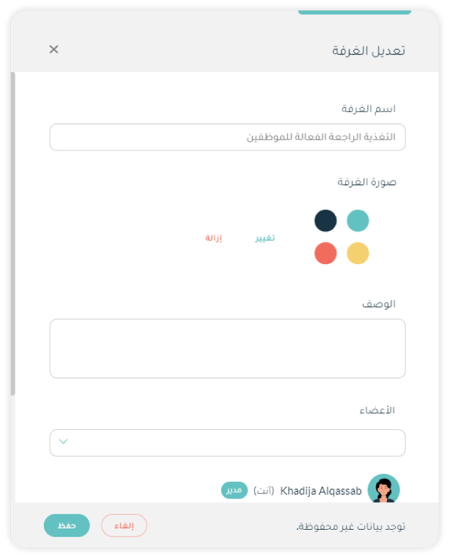
1. حدد غرفة المناقشة التي ترغب في تحريرها.
2. انقر **تحرير (Edit)** لتغيير تفاصيل غرفة المناقشة التي حددتها، بما فيها الاسم، والوصف، والصورة، والأعضاء، والمسؤولين.
3. أدخل الاسم أو الوصف الجديد.
4. قم بتغيير الصورة بنقر **تحديث (Update)** أو إزالتها بنقر **إزالة (Remove).**
5. **اختر المستخدمين** الذين ترغب في إضافتهم إلى هذه المناقشة بصفتهم أعضاء من القائمة المنسدلة أو أدخل اسم المستخدم الذي تبحث عنه.
6. انقر **تعيين مسؤول (Make Admin)** لجعل المستخدم المحدد مسؤولاً عن غرفة المناقشة. إذا رغبت في إزالة تفويض المسؤول من أي مستخدم، انقر **إلغاء مسؤول (Revoke Admin).**
7. انقر**لإزالة عضو** من غرفة المناقشة.
8. انقر **تحديث (Update )** لتأكيد التغييرات التي أجريتها أو **إلغاء (Cancel)** لتجاهل التغييرات والخروج
#### **4. إرسال الرسائل**
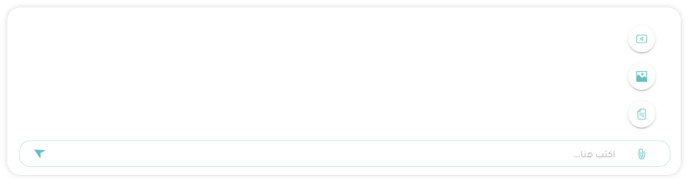
1. انقر **اكتب هنا** ... (**Type here**...) لإدخال نص الرسالة التي ترغب في إرسالها.
2. انقر **إرفاق (Attach)** لإرفاق **صورة** ****أو **فيديو** ****أو **مستند** برسالتك.
3. انقر **إرسال (Send)** أو **Enter** بلوحة المفاتيح لإرسال الرسالة.
4. انقر**** **رد (Reply )** للرد على رسالة محددة مستلمة.
****
- [البدء مع لوموفاي](https://help.lumofy.com/migration/ar-eg/%D8%A7%D9%84%D8%A8%D8%AF%D8%A1-%D9%85%D8%B9-%D9%84%D9%88%D9%85%D9%88%D9%81%D8%A7%D9%8A?hsLang=ar-eg#main-content)
- [الانضمام إلى لوموفاي](https://help.lumofy.com/migration/ar-eg/%D8%A7%D9%84%D8%A8%D8%AF%D8%A1-%D9%85%D8%B9-%D9%84%D9%88%D9%85%D9%88%D9%81%D8%A7%D9%8A?hsLang=ar-eg#%D8%A7%D9%84%D8%A7%D9%86%D8%B6%D9%85%D8%A7%D9%85-%D8%A5%D9%84%D9%89-%D9%84%D9%88%D9%85%D9%88%D9%81%D8%A7%D9%8A)
- [التواصُل مع فريق الدعم والمساعدة](https://help.lumofy.com/migration/ar-eg/%D8%A7%D9%84%D8%A8%D8%AF%D8%A1-%D9%85%D8%B9-%D9%84%D9%88%D9%85%D9%88%D9%81%D8%A7%D9%8A?hsLang=ar-eg#%D8%A7%D9%84%D8%AA%D9%88%D8%A7%D8%B5%D9%8F%D9%84-%D9%85%D8%B9-%D9%81%D8%B1%D9%8A%D9%82-%D8%A7%D9%84%D8%AF%D8%B9%D9%85-%D9%88%D8%A7%D9%84%D9%85%D8%B3%D8%A7%D8%B9%D8%AF%D8%A9)
- [لوموفاي للمدراء](https://help.lumofy.com/migration/ar-eg/%D9%84%D9%88%D9%85%D9%88%D9%81%D8%A7%D9%8A-%D9%84%D9%84%D9%85%D8%AF%D8%B1%D8%A7%D8%A1?hsLang=ar-eg#main-content)
- [شريط أدوات التنقل للمسؤولين](https://help.lumofy.com/migration/ar-eg/%D9%84%D9%88%D9%85%D9%88%D9%81%D8%A7%D9%8A-%D9%84%D9%84%D9%85%D8%AF%D8%B1%D8%A7%D8%A1?hsLang=ar-eg#%D8%B4%D8%B1%D9%8A%D8%B7-%D8%A3%D8%AF%D9%88%D8%A7%D8%AA-%D8%A7%D9%84%D8%AA%D9%86%D9%82%D9%84-%D9%84%D9%84%D9%85%D8%B3%D8%A4%D9%88%D9%84%D9%8A%D9%86)
- [لوحة القيادة](https://help.lumofy.com/migration/ar-eg/%D9%84%D9%88%D9%85%D9%88%D9%81%D8%A7%D9%8A-%D9%84%D9%84%D9%85%D8%AF%D8%B1%D8%A7%D8%A1?hsLang=ar-eg#%D9%84%D9%88%D8%AD%D8%A9-%D8%A7%D9%84%D9%82%D9%8A%D8%A7%D8%AF%D8%A9)
- [الإدارة](https://help.lumofy.com/migration/ar-eg/%D9%84%D9%88%D9%85%D9%88%D9%81%D8%A7%D9%8A-%D9%84%D9%84%D9%85%D8%AF%D8%B1%D8%A7%D8%A1?hsLang=ar-eg#%D8%A7%D9%84%D8%A5%D8%AF%D8%A7%D8%B1%D8%A9)
- [لوموفاي للمتدربين](https://help.lumofy.com/migration/ar-eg/%D9%84%D9%88%D9%85%D9%88%D9%81%D8%A7%D9%8A-%D9%84%D9%84%D9%85%D8%AA%D8%AF%D8%B1%D8%A8%D9%8A%D9%86?hsLang=ar-eg#main-content)
- [خريطة تصفُّح منصة التدريب](https://help.lumofy.com/migration/ar-eg/%D9%84%D9%88%D9%85%D9%88%D9%81%D8%A7%D9%8A-%D9%84%D9%84%D9%85%D8%AA%D8%AF%D8%B1%D8%A8%D9%8A%D9%86?hsLang=ar-eg#%D8%AE%D8%B1%D9%8A%D8%B7%D8%A9-%D8%AA%D8%B5%D9%81%D9%8F%D9%91%D8%AD-%D9%85%D9%86%D8%B5%D8%A9-%D8%A7%D9%84%D8%AA%D8%AF%D8%B1%D9%8A%D8%A8)
- [لوحة معلومات المتدرب](https://help.lumofy.com/migration/ar-eg/%D9%84%D9%88%D9%85%D9%88%D9%81%D8%A7%D9%8A-%D9%84%D9%84%D9%85%D8%AA%D8%AF%D8%B1%D8%A8%D9%8A%D9%86?hsLang=ar-eg#%D9%84%D9%88%D8%AD%D8%A9-%D9%85%D8%B9%D9%84%D9%88%D9%85%D8%A7%D8%AA-%D8%A7%D9%84%D9%85%D8%AA%D8%AF%D8%B1%D8%A8)
- [تصفُّح مكتبة عناصر تدريب لوموفاي](https://help.lumofy.com/migration/ar-eg/%D9%84%D9%88%D9%85%D9%88%D9%81%D8%A7%D9%8A-%D9%84%D9%84%D9%85%D8%AA%D8%AF%D8%B1%D8%A8%D9%8A%D9%86?hsLang=ar-eg#%D8%AA%D8%B5%D9%81%D9%8F%D9%91%D8%AD-%D9%85%D9%83%D8%AA%D8%A8%D8%A9-%D8%B9%D9%86%D8%A7%D8%B5%D8%B1-%D8%AA%D8%AF%D8%B1%D9%8A%D8%A8-%D9%84%D9%88%D9%85%D9%88%D9%81%D8%A7%D9%8A)
- [كيفية تصفُّح مكتبة لوموفاي للمسارات التدريبية](https://help.lumofy.com/migration/ar-eg/%D9%84%D9%88%D9%85%D9%88%D9%81%D8%A7%D9%8A-%D9%84%D9%84%D9%85%D8%AA%D8%AF%D8%B1%D8%A8%D9%8A%D9%86?hsLang=ar-eg#%D9%83%D9%8A%D9%81%D9%8A%D8%A9-%D8%AA%D8%B5%D9%81%D9%8F%D9%91%D8%AD-%D9%85%D9%83%D8%AA%D8%A8%D8%A9-%D9%84%D9%88%D9%85%D9%88%D9%81%D8%A7%D9%8A-%D9%84%D9%84%D9%85%D8%B3%D8%A7%D8%B1%D8%A7%D8%AA-%D8%A7%D9%84%D8%AA%D8%AF%D8%B1%D9%8A%D8%A8%D9%8A%D8%A9)
- [كيفية تصفُّح مكتبة تقييمات لوموفاي](https://help.lumofy.com/migration/ar-eg/%D9%84%D9%88%D9%85%D9%88%D9%81%D8%A7%D9%8A-%D9%84%D9%84%D9%85%D8%AA%D8%AF%D8%B1%D8%A8%D9%8A%D9%86?hsLang=ar-eg#%D9%83%D9%8A%D9%81%D9%8A%D8%A9-%D8%AA%D8%B5%D9%81%D9%8F%D9%91%D8%AD-%D9%85%D9%83%D8%AA%D8%A8%D8%A9-%D8%AA%D9%82%D9%8A%D9%8A%D9%85%D8%A7%D8%AA-%D9%84%D9%88%D9%85%D9%88%D9%81%D8%A7%D9%8A)
- [تعيين خطط تنميتك الشخصية وتتبعها](https://help.lumofy.com/migration/ar-eg/%D9%84%D9%88%D9%85%D9%88%D9%81%D8%A7%D9%8A-%D9%84%D9%84%D9%85%D8%AA%D8%AF%D8%B1%D8%A8%D9%8A%D9%86?hsLang=ar-eg#%D8%AA%D8%B9%D9%8A%D9%8A%D9%86-%D8%AE%D8%B7%D8%B7-%D8%AA%D9%86%D9%85%D9%8A%D8%AA%D9%83-%D8%A7%D9%84%D8%B4%D8%AE%D8%B5%D9%8A%D8%A9-%D9%88%D8%AA%D8%AA%D8%A8%D8%B9%D9%87%D8%A7)
- [لوحة المتصدّرين](https://help.lumofy.com/migration/ar-eg/%D9%84%D9%88%D9%85%D9%88%D9%81%D8%A7%D9%8A-%D9%84%D9%84%D9%85%D8%AA%D8%AF%D8%B1%D8%A8%D9%8A%D9%86?hsLang=ar-eg#%D9%84%D9%88%D8%AD%D8%A9-%D8%A7%D9%84%D9%85%D8%AA%D8%B5%D8%AF%D9%91%D8%B1%D9%8A%D9%86)
- [أهدافي](https://help.lumofy.com/migration/ar-eg/%D9%84%D9%88%D9%85%D9%88%D9%81%D8%A7%D9%8A-%D9%84%D9%84%D9%85%D8%AA%D8%AF%D8%B1%D8%A8%D9%8A%D9%86?hsLang=ar-eg#%D8%A3%D9%87%D8%AF%D8%A7%D9%81%D9%8A)
- [مناقشات المنصة](https://help.lumofy.com/migration/ar-eg/%D9%84%D9%88%D9%85%D9%88%D9%81%D8%A7%D9%8A-%D9%84%D9%84%D9%85%D8%AA%D8%AF%D8%B1%D8%A8%D9%8A%D9%86?hsLang=ar-eg#%D9%85%D9%86%D8%A7%D9%82%D8%B4%D8%A7%D8%AA-%D8%A7%D9%84%D9%85%D9%86%D8%B5%D8%A9)
- [تابع أنشطة تدريبك باستمرار](https://help.lumofy.com/migration/ar-eg/%D9%84%D9%88%D9%85%D9%88%D9%81%D8%A7%D9%8A-%D9%84%D9%84%D9%85%D8%AA%D8%AF%D8%B1%D8%A8%D9%8A%D9%86?hsLang=ar-eg#%D8%AA%D8%A7%D8%A8%D8%B9-%D8%A3%D9%86%D8%B4%D8%B7%D8%A9-%D8%AA%D8%AF%D8%B1%D9%8A%D8%A8%D9%83-%D8%A8%D8%A7%D8%B3%D8%AA%D9%85%D8%B1%D8%A7%D8%B1)
- [الإعدادات](https://help.lumofy.com/migration/ar-eg/%D9%84%D9%88%D9%85%D9%88%D9%81%D8%A7%D9%8A-%D9%84%D9%84%D9%85%D8%AA%D8%AF%D8%B1%D8%A8%D9%8A%D9%86?hsLang=ar-eg#%D8%A7%D9%84%D8%A5%D8%B9%D8%AF%D8%A7%D8%AF%D8%A7%D8%AA)
- [إدارة ملفك الشخصي](https://help.lumofy.com/migration/ar-eg/%D9%84%D9%88%D9%85%D9%88%D9%81%D8%A7%D9%8A-%D9%84%D9%84%D9%85%D8%AA%D8%AF%D8%B1%D8%A8%D9%8A%D9%86?hsLang=ar-eg#%D8%A5%D8%AF%D8%A7%D8%B1%D8%A9-%D9%85%D9%84%D9%81%D9%83-%D8%A7%D9%84%D8%B4%D8%AE%D8%B5%D9%8A)
- Home
- Products
- Pricing
- Blog
- Company
[](http://www.lumofy.com)
مركز المساعدة
حقوق النشر © 2026، Lumofy