---
title: Managing Job Roles
description: To manage the Job Roles in your organization on the platform, Click on Admin in the navigation bar. Then click on Job Roles. This page will enable you to view a list of all the job roles in your orga
---
[Skip to content](https://help.lumofy.com/migration/managing-job-roles#main-content)
- [English](https://help.lumofy.com/migration/managing-job-roles)
- [العربية - مصر](https://help.lumofy.com/migration/ar-eg/إدارة-الأدوار-الوظيفية)
English
Show submenu for translations
![Logo\_Lumofy\_EN\_Main\_Secondary\_Horizontal.svg\]](https://help.lumofy.com/hubfs/Logo_Lumofy_EN_Main_Secondary_Horizontal.svg)
- Home
- Products
- Pricing
- Blog
- Company
Open main navigation
Close main navigation
- Home
- Products
- Pricing
- Blog
- Company
- - [English](https://help.lumofy.com/migration/managing-job-roles)
- [العربية - مصر](https://help.lumofy.com/migration/ar-eg/إدارة-الأدوار-الوظيفية)
English
Show submenu for translations
- Go to lumofy.ai
Go to lumofy.ai
Hello. How can we help you?
- There are no suggestions because the search field is empty.
1. [Help Center](https://help.lumofy.com/migration?hsLang=en)
2. [Lumofy For Admins](https://help.lumofy.com/migration/lumofy-for-admins?hsLang=en)
3. [Admin](https://help.lumofy.com/migration/lumofy-for-admins?hsLang=en#admin)
# Managing Job Roles
### **Job Roles**
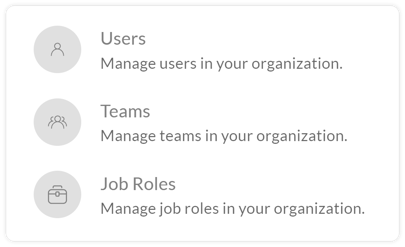
To manage the Job Roles in your organizationon the platform,Click on **Admin** in the navigation bar. Then click on **Job Roles**.
This page will enable you to view a list of all the job roles in your organization, the level, the number of users belonging to each job role, and the percentage of their Enrollment Completion and Total Compliance.
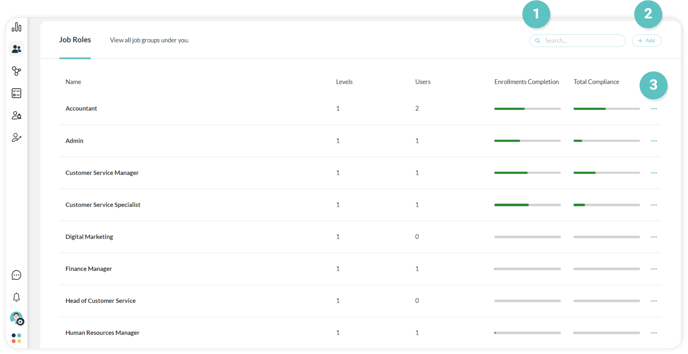
#### **1. Search Bar**
To easily find a specific Job Role, use the**Search Bar** to enter the name of the position you are looking for.
#### **2. Add Job Role**
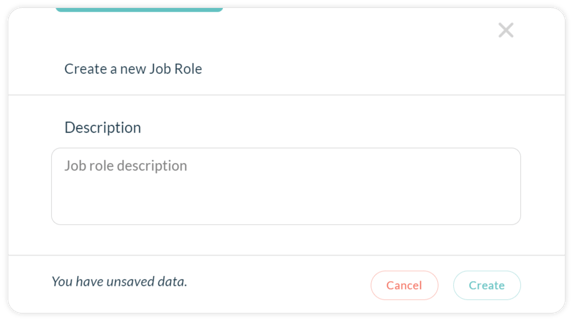
Click **Add** to manually include a new Job Role to the platform. Click on **Create a New Job Role** and follow the steps below to perform this action successfully:
1. Enter the **Name** of the Job Role you wish to create.
2. Write a brief **Description** of the job role.
3. Click **Create** to add the job role to the platform.
#### 2. Add Job Role
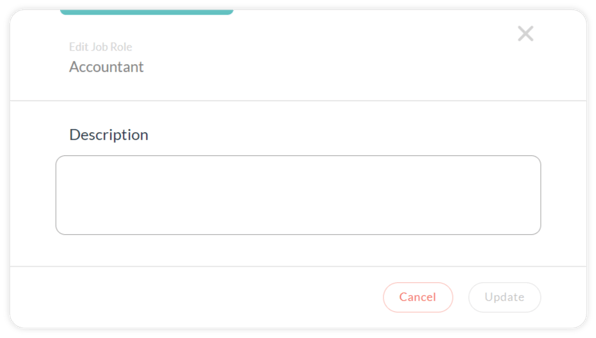
Click on **Options Menu on** the right, then **Edit** to amend the details pertaining to the selected Job Role. Follow the steps below to Edit the Job Role details successfully:
1. Enter the new **Name** of the Job Role.
2. Add a **Description** to the role.
3. Press **Update** to save the changes made.
- [Getting Started with Lumofy](https://help.lumofy.com/migration/getting-started-with-lumofy?hsLang=en#main-content)
- [Onboarding On Lumofy](https://help.lumofy.com/migration/getting-started-with-lumofy?hsLang=en#onboarding-on-lumofy)
- [How to get help with Lumofy](https://help.lumofy.com/migration/getting-started-with-lumofy?hsLang=en#how-to-get-help-with-lumofy)
- [Lumofy For Admins](https://help.lumofy.com/migration/lumofy-for-admins?hsLang=en#main-content)
- [Admin Navigation Toolbar](https://help.lumofy.com/migration/lumofy-for-admins?hsLang=en#admin-navigation-toolbar)
- [Insights Dashboard](https://help.lumofy.com/migration/lumofy-for-admins?hsLang=en#insights-dashboard)
- [Admin](https://help.lumofy.com/migration/lumofy-for-admins?hsLang=en#admin)
- [Map](https://help.lumofy.com/migration/lumofy-for-admins?hsLang=en#map)
- [Assess](https://help.lumofy.com/migration/lumofy-for-admins?hsLang=en#assess)
- [Author](https://help.lumofy.com/migration/lumofy-for-admins?hsLang=en#author)
- [Disscussions](https://help.lumofy.com/migration/lumofy-for-admins?hsLang=en#disscussions)
- [Notifications](https://help.lumofy.com/migration/lumofy-for-admins?hsLang=en#notifications)
- [Lumofy For Learners](https://help.lumofy.com/migration/lumofy-for-learners?hsLang=en#main-content)
- [Learner Navigation Toolbar](https://help.lumofy.com/migration/lumofy-for-learners?hsLang=en#learner-navigation-toolbar)
- [Dashboard](https://help.lumofy.com/migration/lumofy-for-learners?hsLang=en#dashboard)
- [Items Library](https://help.lumofy.com/migration/lumofy-for-learners?hsLang=en#items-library)
- [Paths Library](https://help.lumofy.com/migration/lumofy-for-learners?hsLang=en#paths-library)
- [Assessments Library](https://help.lumofy.com/migration/lumofy-for-learners?hsLang=en#assessments-library)
- [Leaderboard](https://help.lumofy.com/migration/lumofy-for-learners?hsLang=en#leaderboard)
- [Discussions](https://help.lumofy.com/migration/lumofy-for-learners?hsLang=en#discussions)
- [Notifications](https://help.lumofy.com/migration/lumofy-for-learners?hsLang=en#notifications)
- [Settings](https://help.lumofy.com/migration/lumofy-for-learners?hsLang=en#settings)
- [Profile](https://help.lumofy.com/migration/lumofy-for-learners?hsLang=en#profile)
- Home
- Products
- Pricing
- Blog
- Company
[](http://www.lumofy.com)
Help Center
Copyright © 2026, Lumofy